Friday, 30 March 2007 21:01 | Written by WolfManz611
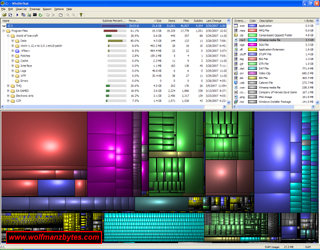
Ever wonder where all your hard drive space goes? I know every once in a while I start looking at windows explorer and sit there wondering where all my drive space has gone. The only way to see where the space is gone is to select a folder and then right click and select properties. When you do this windows will go through and basically add up all the files and folders in a selected folder and tell you what that folder is taking up for space. However today I have a better way of doing this and it comes in the way of a program called WinDirStat.